
Buyer’s guide
How to Choose Screening and Sanitation Equipment for Your Site
The Defense category focuses on equipment that helps protect people at an entrance or in a shared space: thermal temperature cameras, touchless thermal scanners and UV sanitizing tools. Picking the right one starts with how many people pass through a point, how fast they need to move and who will be watching the results.
A small office with one front door has very different needs from a warehouse shift change or a clinic lobby. Before you compare models, walk the entry point you want to cover. Note where people queue, where the light comes from, whether doors open to outdoor heat, and whether a staff member will be standing there or the device will run on its own.
Handheld or countertop scanners
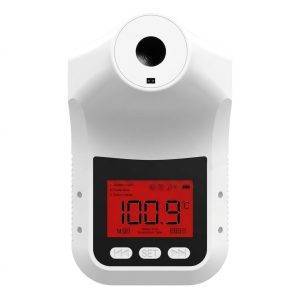
Touchless thermometers such as the Industrial Hands Free Body Thermometer Pro suit low-traffic entrances where one person at a time steps up. They are simple to deploy and move, but each reading depends on the person holding their wrist or forehead in the right spot.
Combined thermometer and sanitizer stations
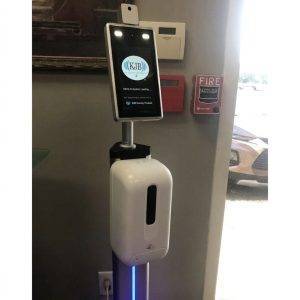
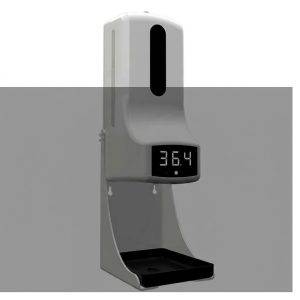
A touchless thermometer paired with a hand sanitizer station combines two entry steps at one post. This works well for reception desks, break rooms and visitor check-in where you want a single, visible stop.
Body temperature scanner cameras
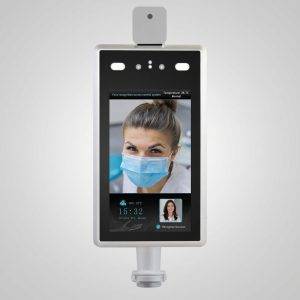
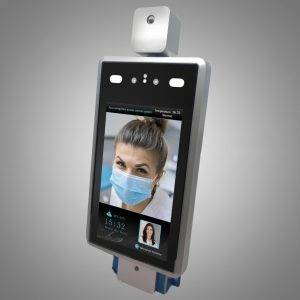
Camera-based scanners read skin temperature as people approach, which reduces contact and can speed a line. The wall-mounted version frees floor space; the stand-mounted version can move between doors.
Multi-person thermal imaging
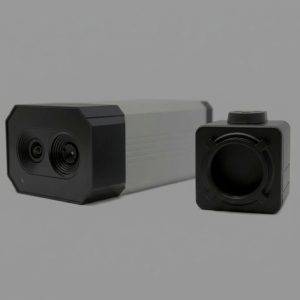
The 30 Person Thermal Image Body Temp Camera is built for crowded entry points where screening one person at a time would create a bottleneck. It is the heavier investment and benefits most from careful placement and a trained operator.
Kits with stands
The TMT2 camera bundle with a 4 ft stand and hand sanitizer set gives you a ready-to-place station. Kits reduce the guesswork of matching mounts and accessories to a specific camera.
UV sanitizing tools
A UV Sanitizer Gun is intended for surfaces and objects such as keyboards, counters and shared tools. It supplements, rather than replaces, routine cleaning with appropriate products.
What matters
Specifications and Setup Factors That Actually Affect Readings
Thermal screening devices measure surface temperature, and surface temperature is easily influenced by the environment. Most disappointing results come from placement and process, not from the device itself.
| Factor | Why it matters | What to check |
|---|---|---|
| Throughput | Determines whether one-at-a-time screening creates a line | Peak arrivals at your busiest entrance and shift change |
| Distance and field of view | Readings depend on the subject standing within the range the manufacturer specifies | Floor markings, stand height and a clear approach path |
| Ambient conditions | Direct sun, drafts and people arriving from outdoor heat can skew skin temperature | An indoor spot away from doors, windows and HVAC vents |
| Acclimation time | Skin that was just outside may read higher or lower than normal | A short wait area before the screening point, where practical |
| Mounting | Stable mounts keep the angle and distance consistent | Wall mount, desktop stand or floor stand matched to the space |
| Operator workflow | Someone must decide what happens after an elevated reading | A written secondary check and a private place to conduct it |
In Arizona, heat is a real consideration. Employees and visitors walking in from a parking lot in summer can register elevated skin temperatures that have nothing to do with illness. A brief indoor pause, a confirmation reading with a handheld thermometer and a consistent procedure all help reduce false alarms.
Common mistakes to avoid
- Placing a scanner in a glass vestibule or next to an exterior door, where sun and outside air change skin temperature from minute to minute.
- Buying a multi-person camera for an entrance that sees only a handful of arrivals, then leaving it unattended because no one was assigned to watch it.
- Skipping the secondary check, so a single reading decides whether someone can enter.
- Letting the queue see the display, which exposes one person’s reading to everyone behind them.
- Moving a stand between rooms without re-checking the distance and angle the camera needs.
- Treating screening as the only control; it works alongside cleaning routines, clear sick-leave practices and good ventilation.
For example, a property manager screening at a leasing office might choose a countertop thermometer with a sanitizer station, while a distribution center with a large shift change might pair a camera scanner on a stand with a handheld unit for confirmation readings.
These products are screening tools, not medical diagnostic devices. An elevated reading is a prompt for a follow-up step under your own policy, not a diagnosis. Follow the manufacturer’s instructions and any public health guidance that applies to your setting.
Use and compliance
Deploying Screening Responsibly: Privacy, Policy and Safety
Temperature data about an identifiable person is sensitive. How you collect, display and keep it matters as much as the hardware you choose.
- Write the policy first. Decide who is screened, what threshold triggers a second check, who conducts that check and what happens next. Apply it consistently to everyone in the defined group.
- Tell people in advance. Post clear notice at the entrance so employees and visitors know screening takes place and why.
- Limit what you record. Many sites do not need to store images or individual readings at all. If you do keep records, restrict access, store them separately from general personnel files and set a retention period.
- Protect the screen. Position displays so people in line cannot see another person’s reading or thermal image.
- Handle follow-ups privately. Conduct secondary checks away from the queue and treat the result as confidential.
- Review periodically. Revisit whether screening is still needed and whether the process is working as intended.
Employment, disability and health-privacy rules can apply to workplace screening, and requirements vary by industry and jurisdiction. This is general information, not legal advice; confirm your program with counsel or your HR advisor before rollout.
UV sanitizing tools carry their own precautions. Ultraviolet light used for sanitizing can harm skin and eyes, so never point a UV device at people or animals, keep it away from children and follow the exposure time and distance in the product instructions.
Ownership
Care, Maintenance and Knowing When to Bring in Professionals
A screening station is only as reliable as the routine behind it. A few habits keep devices consistent and staff confident in the readings.
- Keep lenses and sensor windows clean using the method the manufacturer recommends; smudges and dust affect thermal readings.
- Leave devices powered in their final position long enough to stabilize before the first shift arrives.
- Check mounts, stand height and floor markings weekly so the subject distance stays consistent.
- Keep firmware and any companion software up to date, and change default passwords on networked cameras.
- Refill sanitizer stations on a schedule rather than waiting for them to run empty, and wipe down dispensers and touch points during routine cleaning.
- Store handheld units and UV tools in a clean, dry place between uses, and keep spare batteries or chargers where staff can find them.
- Keep a simple log of issues so patterns, such as readings drifting at a particular door, are easy to spot.
Equipment works best as one layer of a broader plan. If you manage a facility with multiple entrances, heavy visitor traffic or staff who are uneasy about confronting people, a trained officer at the door can run screening and access control together. Our armed and unarmed security guard services in Arizona can staff entry points, and a corporate security risk assessment can help decide where screening, cameras and people fit best.
Any camera that connects to your network is also a potential entry point for attackers. If you are adding connected devices to a business network, consider how they are segmented and monitored; our managed cyber security services can help with that side of the rollout.
FAQ
Defense Products: Buyer Questions
Which device should a small office start with?
For one entrance and modest traffic, a touchless thermometer or a thermometer with a sanitizer station is usually enough. Camera-based scanners make more sense when lines form or when you want to reduce contact between staff and visitors.
Can a thermal camera tell whether someone is sick?
No. These devices estimate skin temperature, which can be affected by heat, exercise and the environment. Treat any elevated reading as a reason for a private follow-up under your written policy, not as a conclusion about a person’s health.
Do I need to store screening results?
Often you do not. Storing less information reduces privacy risk. If your policy requires records, limit access, keep them confidential and set a retention period. Requirements vary, so confirm with counsel.
Where should I place a camera scanner?
Indoors, out of direct sunlight and away from doors, drafts and vents, with a clear approach path at the distance specified by the manufacturer. Floor markings help people stop in the right spot.
What if a device arrives damaged or does not work?
Returns are accepted for defective devices. Review the refund policy for details, and contact us promptly with a description of the problem.
Can you help set up a screening program for my business?
Yes. Call 602-725-2818 or request a consultation to talk through your entrances, staffing and how equipment fits your overall security plan.