

What an examiner recovers from a modern iPhone or Android depends less on the brand than on one variable: whether the phone can be unlocked. Both platforms encrypt data at rest with hardware-bound keys tied to the passcode. Locked with an unknown passcode, examiners often get little; unlocked, a skilled examiner can extract messages, deleted records, location history, and app data in extraordinary depth. The real contest is over device state and access, not operating system.
Executives, general counsel, and principals in litigation, internal investigations, or personal-security matters are routinely told two opposite myths: that a phone is an unbreakable black box, or that any investigator can “just get everything.” Both are wrong, and both are expensive. The truth is technical and situational. Understanding what a competent examiner can actually recover from an iPhone versus an Android—and what legal process is required to compel it—lets you set realistic expectations, avoid spoliation, and direct resources where they will actually produce admissible evidence.
Why does encryption decide everything in mobile forensics?
Modern smartphones do not merely password-protect a file system; they encrypt it with keys that are entangled with the user’s passcode and locked inside dedicated security hardware. On the iPhone, that hardware is the Secure Enclave, a coprocessor that stores cryptographic keys and enforces a rising time delay after each wrong passcode guess. Apple’s data-protection architecture ties file keys to a class key that is itself derived from the passcode and a hardware key that never leaves the Enclave. Without the passcode, the data on the flash storage is mathematically inaccessible ciphertext.
Android reaches the same destination by a different road. Contemporary devices use File-Based Encryption (FBE), where each file is encrypted with keys bound to the user’s credential and protected by a hardware-backed keystore—Google’s Titan M/M2 on Pixel devices, or equivalent Trusted Execution Environments and StrongBox implementations on other manufacturers. The result is the same as on iOS: on a properly configured, current device, the data at rest is useless without the credential or a way to defeat the hardware that guards it. This is why the single most important question an examiner asks is not “iPhone or Android?” but “what state is the device in, and do we have the passcode?”
What does “device state” mean—BFU versus AFU?
The concept that separates competent mobile forensics from wishful thinking is the distinction between Before First Unlock (BFU) and After First Unlock (AFU). When a phone powers on and has not yet been unlocked even once, most decryption keys remain sealed in hardware and the vast majority of user data is encrypted and unreadable. This is the BFU state—the strongest posture, and the reason security guidance for at-risk custodians is simply to power the device off.
Once the user enters the passcode after boot, keys are derived into memory to make files readable. Even after it re-locks, the device is now in the AFU state, and many—though not all—keys remain resident in memory. AFU is dramatically more favorable to an examiner: with the right tooling, large portions of the file system can be extracted even while the screen is locked, because the keys needed to decrypt them are still live. The practical implications are stark: a phone seized powered-on and kept alive is a far richer evidence source than the same phone seized cold, and the handling decisions made in the first minutes often determine the entire outcome.
What are the levels of mobile extraction?
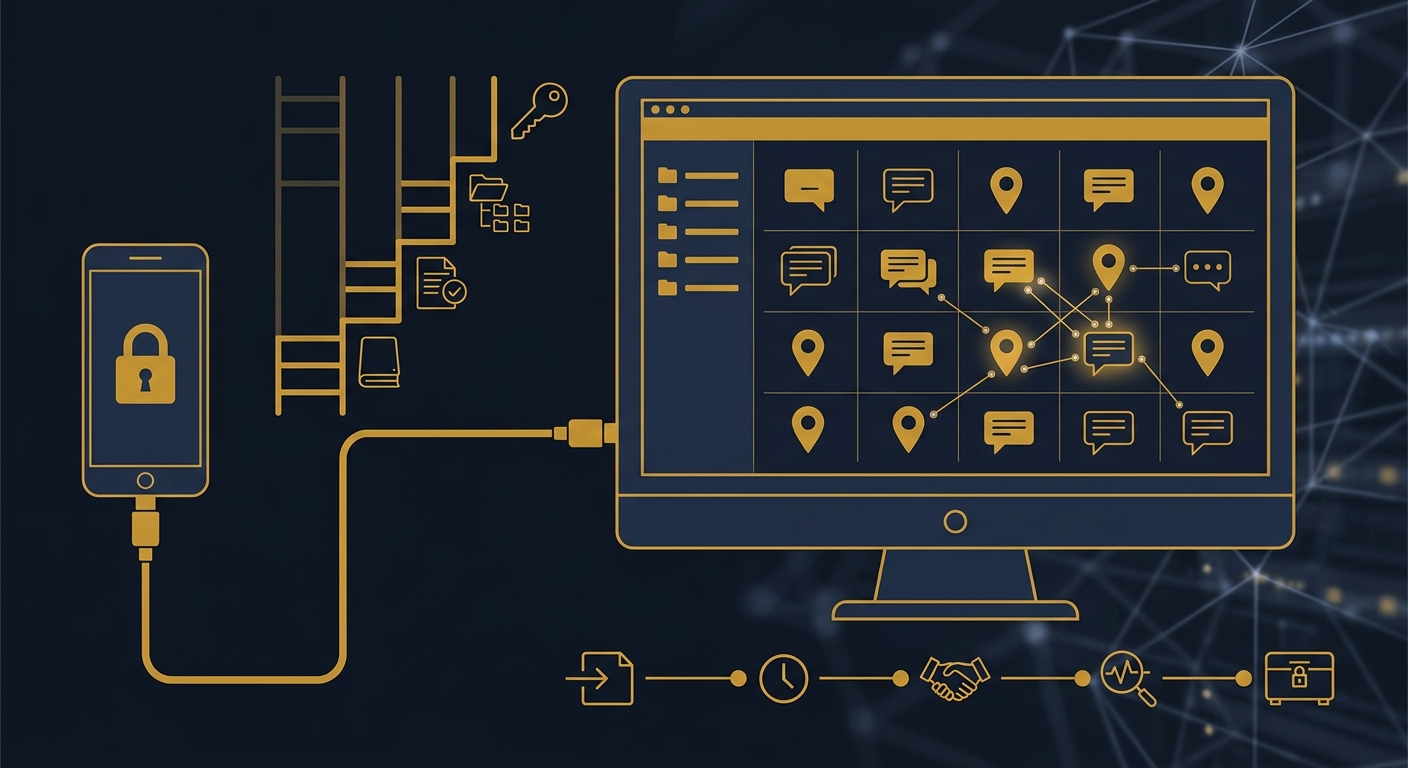
“Getting into a phone” is not one procedure but a ladder of increasingly invasive techniques, each recovering more data and each harder to achieve. A credible examiner tells you which tier a given device permits before quoting outcomes.
- Manual examination. An examiner navigates the live device by hand and photographs what is on screen. Simple, but it captures only what is visible and touches nothing beneath the surface.
- Logical extraction. Uses the device’s own backup and sync interfaces to pull active data—contacts, call logs, messages, some app content. Fast and well-supported, but limited to what the OS chooses to expose and typically excludes deleted items.
- File system extraction. Recovers the application and system file structure, including databases, caches, and often deleted records still present in database journals and unallocated space. This is the tier where deleted messages, location artifacts, and rich app data most often surface—and it generally requires an unlocked or AFU device.
- Physical / full extraction. A bit-for-bit image of the storage. Historically the gold standard, it is now the exception on encrypted devices because the raw image is ciphertext unless the keys are also recovered. Where an exploit or vendor tool can pair a full image with key extraction, it yields the deepest results.
The tools that perform this work—commercial platforms used by law enforcement and private examiners alike—succeed or fail based on device model, chipset, OS version, and patch level. A vulnerability that unlocks one generation of hardware is silently closed in the next security update, which is why capability is a moving target and any honest examiner speaks in terms of “this model on this build,” never blanket guarantees.
iPhone versus Android: what can examiners actually get?
The honest comparison is not “one is easy and one is impossible.” It is that each platform presents different obstacles, and the outcome turns on model, OS version, and access. The table below reflects the realistic landscape on current, fully patched devices.
| Dimension | iPhone (iOS) | Android |
|---|---|---|
| Encryption at rest | Data Protection classes, keys bound to Secure Enclave | File-Based Encryption, keys in hardware keystore/StrongBox |
| Hardware guardian | Secure Enclave (uniform across models) | Titan M/M2, TEE, or OEM equivalent (varies widely) |
| Ecosystem consistency | Narrow, predictable hardware set | Highly fragmented across manufacturers and chipsets |
| Locked, unknown passcode (BFU) | Very limited; strong protection | Very limited on current builds; strong protection |
| Unlocked or passcode known (AFU) | Deep file-system extraction, incl. many deleted items | Deep file-system extraction, incl. many deleted items |
| Older / unpatched models | Some legacy chipsets exposed to boot-level exploits | Some chipsets exposed via download/EDL modes or unlocked bootloaders |
| Cloud fallback | iCloud backups & sync (unless Advanced Data Protection) | Google account backup & sync data |
| Encrypted-app content | Recoverable if the device is unlocked and the app is open | Recoverable if the device is unlocked and the app is open |
Apple’s tightly controlled, uniform hardware means that when a defeat exists it applies broadly, but Apple closes those gaps quickly and its newest devices are formidable. Android’s fragmentation cuts both ways: a mid-tier device from a manufacturer with weak firmware may be far easier to access than a flagship, while a current Pixel or Samsung flagship with a hardware keystore can be as hard as any iPhone. On both platforms, an unlocked or AFU device with a known passcode is where the richest evidence lives—including message content, deleted database records, granular location history, browser and app artifacts, and metadata that establishes who did what, when.
What about iMessage, encrypted apps, and “disappearing” messages?
iMessage and Signal, WhatsApp, Telegram, and similar apps encrypt messages in transit—end to end—so intercepting them mid-flight yields nothing readable. But end-to-end encryption protects the message on the wire, not on the endpoint. Once a message is delivered and decrypted for the recipient to read, it lives on the device inside an app database. If an examiner can reach that database—because the phone is unlocked or in AFU state—the plaintext content is generally recoverable, along with timestamps, participants, and frequently records the user believed were deleted.
Deleted and “disappearing” messages are a persistent source of misunderstanding. Deletion in a chat app usually flags a database row as removed rather than erasing it immediately; until the database is compacted or the space overwritten, those records often remain and can be carved back. Attachments, thumbnails, cached previews, and notification logs frequently survive even when the primary message is gone. This is precisely why file-system extraction—not a simple logical backup—matters: the deleted material lives in journals, write-ahead logs, and unallocated regions that only a deeper extraction reaches. None of it, however, is available if the device stays locked in a BFU state.
When is the cloud the better target than the phone?
When a physical device is locked, damaged, or unavailable, the account behind it is often the more productive avenue. Both ecosystems synchronize enormous volumes of data to the cloud—message backups, photos, contacts, location timelines, and device backups. Recovered lawfully, this data can reconstruct much of what the phone holds, and sometimes more, because it spans multiple devices and longer retention windows.
There are important limits. Apple’s optional Advanced Data Protection extends end-to-end encryption to most iCloud categories, meaning Apple itself cannot produce readable content for those categories in response to legal process. Standard iCloud and Google account data remain accessible to the provider and therefore to lawful demands. The practical playbook is to pursue the device and the cloud in parallel: the device for on-handset artifacts and deleted local records, the provider for backups, sync data, and the connection and login metadata that corroborate a timeline. Which path is viable is dictated as much by legal process as by technology.
What legal process is required to access a phone or its cloud?
Access is a legal question before it is a technical one, and the framework differs sharply between criminal and civil matters and between the device and the account.
- Searching a seized device (criminal). Under the Supreme Court’s decision in Riley v. California, police generally need a warrant to search the contents of a cell phone seized incident to arrest. A lawful examination flows from that warrant and its defined scope.
- Compelling the passcode. Whether a person can be forced to disclose a passcode is unsettled and jurisdiction-dependent, implicating the Fifth Amendment privilege against self-incrimination. Courts have split on passcodes versus biometrics; this is fast-moving law where counsel is essential.
- Cloud and provider records. The Stored Communications Act (part of ECPA) governs demands to providers—subpoena, court order, or warrant depending on the data’s nature and age—and the CLOUD Act addresses data stored abroad. Content generally requires a warrant; certain records may be obtained by court order or subpoena.
- Civil litigation and internal investigations. Access to a party’s device typically comes through discovery, forensic-inspection protocols, and consent—not warrants. On company-owned devices, employer policy and consent often permit examination, but privacy statutes and employee expectations still constrain scope.
- Consent and ownership. The cleanest and fastest path is the informed consent of the device owner or a party with authority over a corporate device—frequently the practical foundation of private-sector engagements.
The governing principle is that capability never authorizes access. Even where an examiner could technically extract a device, doing so without proper legal authority taints the evidence and exposes everyone involved to liability. Elite mobile forensics is as much about defensible authorization and documentation as it is about the extraction itself.
How do you preserve a device so evidence survives?
More evidence is destroyed by mishandling in the first hour than by any encryption feature. Whether you are an executive, in-house counsel, or a security director, the preservation discipline is the same and it is unforgiving.
- Do not use the device. Every unlock, tap, and swipe alters data, overwrites deleted records, and updates timestamps. Curiosity is the enemy of admissibility.
- Preserve the power state as found. If the phone is on, keep it powered and charged; a live, AFU device is far richer than a cold one. If it is off, generally leave it off and consult an examiner before booting.
- Isolate it from networks. Enable airplane mode where appropriate or place the device in a Faraday bag to prevent remote wipe, message deletion, or sync that changes the evidence.
- Do not attempt passcode guesses. Wrong attempts trigger escalating delays and, on some configurations, data-wipe thresholds. Preserve attempts for controlled, authorized procedures.
- Document the chain of custody. Record who held the device, when, and under what authority. A flawless extraction is worthless if custody cannot be proven.
- Engage a qualified examiner early. The right tool, tier, and legal footing are decided before the first connection—not improvised afterward.
Representative scenario: the deleted thread that wasn’t gone
Consider a representative internal-investigation matter in which a departing executive was suspected of exfiltrating confidential deal terms via a messaging app, then deleting the conversation. The company-issued iPhone was recovered still powered on and, under counsel’s direction and with authority over the corporate device, was immediately placed in airplane mode and delivered to an examiner without being unlocked further. Because the device was in an AFU state, a file-system extraction was possible; the “deleted” thread persisted in the app’s write-ahead log, and cached attachment previews and notification records corroborated the timeline. In parallel, lawfully obtained account backups filled the gaps the handset could not. This is an illustrative scenario, not a named client or claimed outcome—but it captures the pattern: state preservation plus the right extraction tier plus a parallel cloud avenue recovered what a hasty, device-fumbling approach would have destroyed.
Frequently asked questions
Can examiners recover deleted iMessages or WhatsApp messages?
Often, yes—if the device can be unlocked or is in an After First Unlock state. Deleting a message in most apps flags a database record rather than erasing it immediately, so a file-system extraction can frequently carve back deleted messages, attachments, and timestamps from journals and unallocated space. If the phone is locked and in a Before First Unlock state with an unknown passcode, recovery is usually not possible.
Is it easier to extract data from an iPhone or an Android?
Neither is uniformly easier. Both encrypt data at rest with hardware-bound keys, so outcomes depend on the exact model, chipset, OS version, patch level, and—above all—whether the device can be unlocked. Apple’s uniform hardware makes capability broad when a defeat exists but is patched quickly. Android’s fragmentation means some devices are easier and some flagships are as hard as any iPhone.
Do you need a warrant to search a phone?
In the criminal context, the Supreme Court’s decision in Riley v. California generally requires a warrant to search a cell phone’s contents. In civil litigation and internal investigations, access typically comes through discovery, forensic-inspection protocols, or the informed consent of the owner—or an employer’s authority over a company-owned device. Cloud and provider data are governed separately under the Stored Communications Act and the CLOUD Act.
What should I do the moment I have a phone that may hold evidence?
Stop using it. Do not unlock, browse, or delete anything, and do not guess the passcode. Keep a powered-on phone charged and isolate it from networks with airplane mode or a Faraday bag to prevent remote wipe or sync. Document who has held the device and under what authority, then engage a qualified examiner before any extraction so the correct tier and legal footing are established first.
About Honeybadger Solutions
Honeybadger Solutions is an Arizona-licensed security and investigations firm providing digital forensics, mobile-device examination, and full-spectrum investigations to organizations, counsel, and principals nationwide and internationally. Our digital-forensics, cybersecurity, financial-investigations, and background-intelligence capabilities are in-house and remote-by-design, executed under recognized methodologies with rigorous chain-of-custody and defensible, court-ready reporting. We operate three Arizona offices—Casa Grande (headquarters), Phoenix, and Oro Valley—and support engagements across every Arizona venue, all U.S. jurisdictions, and abroad. For proactive posture, we also deliver cybersecurity services.
Have a device that may hold decisive evidence? Call 602-725-2818 to brief a forensics lead before anyone touches the phone. Confidential. Court-ready. Nationwide.
Authoritative references: NIST SP 800-101 Rev. 1, Guidelines on Mobile Device Forensics and the U.S. Supreme Court’s decision in Riley v. California (2014).