

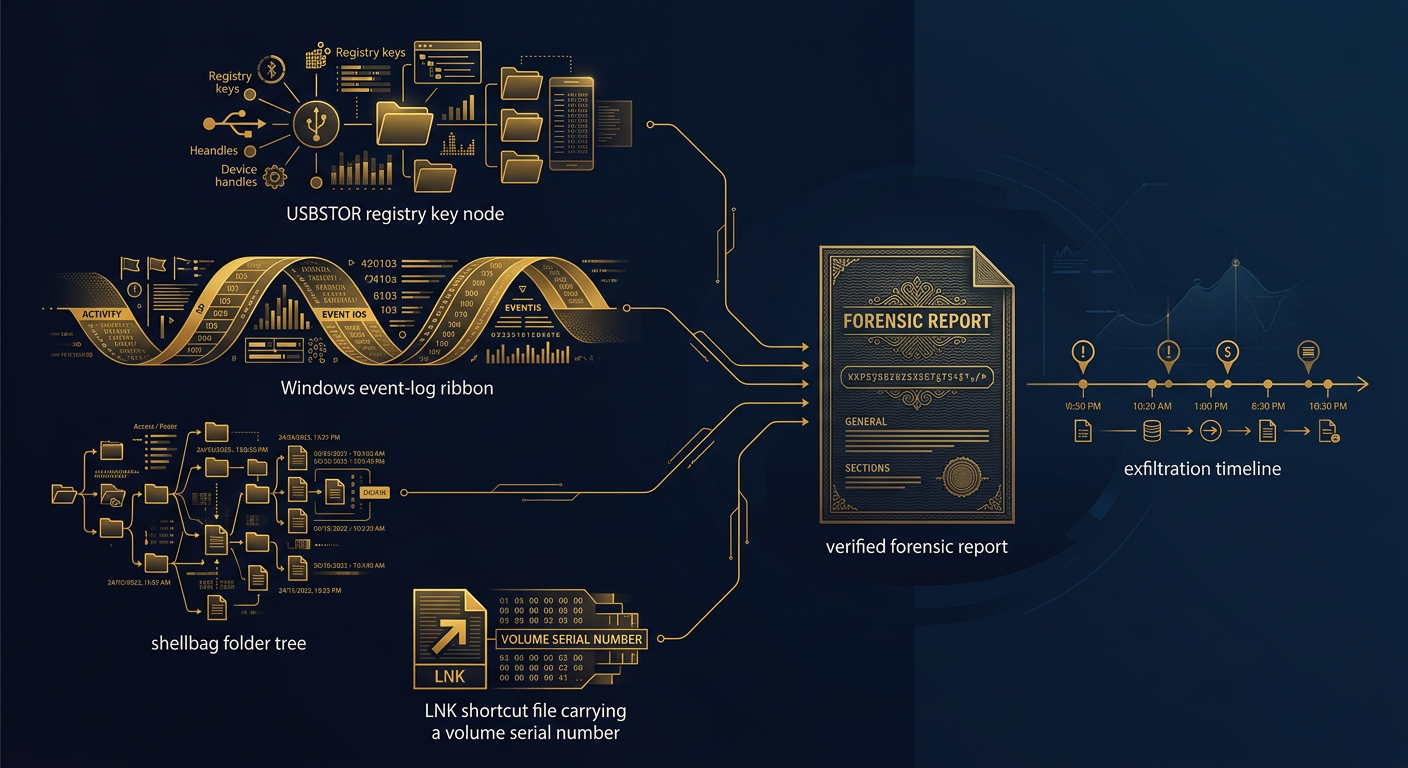
Windows does not keep a single “file copied to USB” log, so proving exfiltration means reconstructing it from many artifacts at once. The USBSTOR registry key identifies the exact device and serial number; event logs and setup logs timestamp when it was connected; and shellbags, LNK files, and jump lists tie specific files and folders on that drive to a user. Correlated and hash-verified, these fragments become a defensible timeline that survives a courtroom challenge.
Removable storage remains the most common vector for data theft by a departing employee, a compromised insider, or a contractor with too much access. A drive costs a few dollars, fits in a pocket, and—unlike an email or an upload—leaves no server-side trail. For general counsel, corporate security leaders, and litigators, the decisive question is rarely whether a USB device was plugged in; it is whether specific, sensitive files actually left on it, when, and by whom. Answering that to an evidentiary standard is a discipline, not a button. This guide explains where the proof lives on a Windows system, how elite examiners assemble it, and what separates a defensible finding from an overstated one.
Why is USB exfiltration so hard to prove—and so provable?
The paradox of USB forensics is that Windows records a great deal about the device and comparatively little about the copy. Out of the box, the operating system does not write an event that says “these ten files were copied to drive E:.” A plain file copy leaves no native audit record unless object-access auditing or a data-loss-prevention agent was already running. That gap is why weak investigations stall at “a USB stick was inserted” and never reach “the client list was taken.”
The strength of the discipline is that the same activity leaves a constellation of indirect traces—in the registry, in Windows event channels, and in the shell artifacts that record a user browsing and opening files. No single one proves theft. Reconciled together, with timestamps aligned and the device’s unique serial number stitched through each layer, they can reconstruct an exfiltration event with a confidence no self-serving witness statement can match. The art is knowing every place the evidence hides and preserving it before routine system activity overwrites it.
What does the Windows registry record about a USB device?
The registry is the anchor of any USB investigation because it uniquely identifies the physical device and, in many cases, timestamps its use. Several keys work in concert, and a competent examiner reads them together rather than relying on any one.
- USBSTOR (
SYSTEM\CurrentControlSet\Enum\USBSTOR) is the primary record. It lists each mass-storage device by vendor, product, and revision, and—crucially—by a device instance ID that usually contains the drive’s hardware serial number. That serial is the fingerprint that lets you distinguish one otherwise-identical thumb drive from another and tie it to a specific device in someone’s possession. - USB (
SYSTEM\CurrentControlSet\Enum\USB) records vendor and product IDs (VID/PID) and complements USBSTOR, including for devices that present differently. - MountedDevices (
SYSTEM\MountedDevices) maps drive letters and volume GUIDs to the underlying device, helping establish which letter (E:, F:) the drive received—essential for matching LNK and shellbag paths later. - Windows Portable Devices (
SOFTWARE\Microsoft\Windows Portable Devices\Devices) often preserves the friendly volume label, another correlation point. - Device Properties timestamps. Under each device’s
Propertiessubkey, Windows stores install, first-connected, last-connected, and last-removed times (the well-known0064,0066, and0067property GUID values), which are central to building a connection timeline.
A subtlety that separates experienced examiners from tool-runners: the second character of the USBSTOR instance ID indicates whether the serial number was assigned by the hardware or generated by Windows. A generated identifier (often shown with an “&” in the second position) is not a reliable unique fingerprint, and treating it as one invites impeachment. Reading the serial correctly—and knowing when it cannot be trusted—is a threshold competency.
Which event logs and setup logs timestamp a connection?
Registry keys identify the device; logs put it on a clock. Windows scatters connection evidence across several channels, and modern versions log more than most people assume.
- setupapi.dev.log. This plain-text setup log records the first time a device was installed on the system—often the single most reliable “first insertion” timestamp, and one that is easy to present to a non-technical audience.
- Microsoft-Windows-Partition/Diagnostic. On Windows 10 and 11, Event ID 1006 captures detailed device parameters at connection, including capacity and identifiers, frequently with the device serial embedded—an increasingly important corroboration source.
- Microsoft-Windows-DriverFrameworks-UserMode/Operational. When enabled, Event IDs such as 2003, 2004, 2005, 2006, 2100, and 2102 mark device arrival and removal, allowing an examiner to pair “plugged in” and “pulled out” times.
- Kernel-PnP and the System log record driver installation and plug-and-play activity for the device.
- Security log Event ID 6416 (“a new external device was recognized”) appears where advanced auditing is configured—common in mature enterprises and a strong, tamper-evident source.
Because logging configuration varies by build and by organization, the disciplined approach is to enumerate which channels are actually present and populated on the specific system, then triangulate the connection window from multiple sources rather than trusting a single timestamp.
How do shellbags, LNK files, and jump lists tie a device to files?
This is where a USB investigation moves from “a drive was connected” to “these files were on it and this user interacted with them”—the evidence that actually matters in a trade-secret or insider matter.
- Shellbags (stored in the user’s
NTUSER.DATandUsrClass.dathives) record folders a user browsed in Windows Explorer, including folders on removable media and their view settings. A shellbag referencing a path on the USB volume is powerful evidence that the account holder opened and navigated the drive—personal, user-specific activity, not a background process. - LNK shortcut files are automatically created when files are opened. A LNK file preserves the target’s full path, its timestamps, and—critically—the volume serial number and volume label of the drive the file lived on. When that volume serial matches the removable drive, a LNK file effectively says “this specific file, on this specific USB device, was opened by this user at this time.”
- Jump lists (
AutomaticDestinationsandCustomDestinations) extend the same idea, recording recently accessed files per application and again embedding path and volume metadata that can point at the removable drive.
The stitching move that defines expert work is correlating the volume serial number across layers. The removable volume’s serial appears in LNK and jump-list artifacts; the device serial appears in USBSTOR and the diagnostic event log. Linking the file-level artifacts to the device-level artifacts—and then to a connection window—builds a chain from “a file was opened” to “on the drive identified as device X, during the period it was connected to this workstation.” That chain, not any single key, is what convinces a court.
USB exfiltration artifacts at a glance
| Artifact | What it proves | Where it lives | Key limitation |
|---|---|---|---|
| USBSTOR registry key | Unique device: vendor, product, serial number | SYSTEM hive (Enum\USBSTOR) | Some serials are OS-generated, not unique |
| Device Properties timestamps | First-connected, last-connected, last-removed | SYSTEM hive (Properties subkey) | Interpretation varies by Windows build |
| setupapi.dev.log | First-ever installation time on this host | Windows setup log (text) | Records first install only, not every use |
| Partition/Diagnostic (ID 1006) | Connection with capacity and identifiers | Windows event log (Win10/11) | May roll over; build-dependent |
| Shellbags | User browsed folders on the drive | NTUSER.DAT / UsrClass.dat | Shows browsing, not that files copied |
| LNK files | Specific file on the drive opened by user | Recent items / per-user profile | Proves access, infers rather than logs a copy |
| Jump lists | Recently used files per application | AutomaticDestinations | Per-app; not all apps populate them |
Can you actually prove files were copied, not just opened?
This is the honest, decisive question, and the answer is: often yes, but rarely from one artifact. Because Windows does not natively log a file copy, proof of exfiltration is built inferentially and corroboratively. World-class examiners are explicit about the difference between what is recorded and what is inferred, and they assemble multiple independent indicators before asserting a copy.
- File-system journals. The NTFS USN change journal and the master file table (
$MFT) can show files being created on the removable volume, with timestamps—when the drive itself is available for examination. - LNK and jump-list evidence placing the source files on the removable volume during the connection window.
- Shellbags showing the user navigating the drive’s folder structure around the same time.
- Prefetch and application artifacts indicating archiving or file-management tools (for example, compression utilities) running near the connection window—often a tell for staging before copying.
- DLP and endpoint logs. Where a data-loss-prevention or endpoint-detection agent was deployed, it may directly log file writes to removable media—the closest thing to a smoking gun, and one reason mature programs deploy them.
Examining the USB device itself, when it can be lawfully obtained, is transformative: a forensic image of the drive can reveal the copied files, their timestamps, and even deleted remnants recoverable from unallocated space. Absent the device, the host-side artifacts above must carry the weight—which they frequently can, provided the examiner presents them as a corroborated pattern rather than overclaiming from any single trace.
What makes USB forensic evidence admissible?
Recovering the artifacts is half the task; the evidence must also survive challenge. Admissibility rests on the same pillars as any digital-forensic record, applied to a domain where opposing counsel will probe every inference.
- Authentication. The proponent must show the evidence is what it claims to be—this host, this device serial, these hives—supported by acquisition records and hashes.
- Reliable methodology. Registry, event-log, and shell-artifact parsing must use validated, generally accepted tools and techniques so expert interpretation withstands a reliability inquiry.
- Chain of custody. A continuous, documented record of who handled each device, image, and export, and when—from preservation through reporting.
- Integrity verification. Cryptographic hashing at acquisition and re-verification later, proving nothing was altered.
- Qualified interpretation. An examiner who can explain the limits—OS-generated serials, timestamp semantics per build, and the gap between “opened” and “copied”—rather than overstating certainty.
- Proper foundation for enterprise records. DLP, EDR, and log-management exports introduced with the appropriate business-records or custodian predicate.
The providers who separate world-class work from a data dump are those who articulate the boundaries of their own evidence. A report that says “the device with serial X was connected during this window, the client-file was opened from that volume, and the file system shows a matching creation on the drive” is far stronger—and far more durable under cross-examination—than one that leaps straight to “the employee stole the data.” Federal courts also recognize streamlined self-authentication for records generated by an electronic process, which underscores why disciplined, hash-verified acquisition matters from the first minute.
How should you preserve the evidence before it is lost?
USB artifacts are perishable. Registry timestamps update, event channels roll over, and—worst of all—continued use of the workstation by IT or the custodian can overwrite the very traces you need. Use this framework the moment exfiltration is suspected.
- Stop using the workstation. Do not let IT “investigate” by logging in and browsing; every login and file open creates new artifacts and can overwrite old ones. Isolate the machine and preserve it powered-down or imaged.
- Image the host forensically. Capture a full, hash-verified image so the registry hives, event logs, setupapi log, shellbags, LNK files, and $MFT are frozen as of the preservation moment.
- Identify and secure the device. If the USB drive is recoverable—still in a desk, a returned asset, or lawful custody—preserve it for separate imaging under counsel’s direction.
- Preserve enterprise logs in parallel. Issue holds for DLP, EDR, and log-management data before their retention windows close, which can be days.
- Establish legal authority. Confirm ownership of the device and data, employment policies and consent, privilege, and any cross-border constraints before acquisition.
- Extract with validated tools and hashing. Parse each artifact category with court-tested tooling and record tool versions.
- Correlate the device serial and volume serial across layers. Stitch USBSTOR, event logs, shellbags, and LNK/jump-list data into one timeline.
- Document continuously. Maintain chain of custody and a defensible narrative from first preservation to final report.
Representative scenario: the drive that named itself
Consider a representative departing-employee matter. A senior salesperson resigned to join a competitor and denied taking anything. Counsel preserved the workstation before IT could touch it. The USBSTOR key showed a personal flash drive with a hardware serial, and the Partition/Diagnostic log timestamped two connections in the employee’s final week. Shellbags recorded the account browsing a folder tree on that volume, and a cluster of LNK files carried the drive’s volume serial number and full paths to the customer pricing workbook and a pipeline export—opened during the second connection window. The $MFT and USN journal on the later-recovered device confirmed matching file creations. No single artifact was decisive; reconciled together, with hashes and chain of custody intact, they reconstructed the event with a confidence the employee’s denial could not withstand. This is an illustrative scenario, not a named client or claimed outcome—but it captures why elite investigations treat USB exfiltration as a multi-artifact discipline, not a single log to pull.
Do you handle USB and insider-exfiltration investigations nationwide?
Yes. Digital forensics is delivered from our Arizona home command across all U.S. jurisdictions and internationally, because host imaging, artifact parsing, and lawful device examination are in-house and remote-by-design. Whether the matter sits in Phoenix, another state, or abroad, the same standards apply—hash-verified acquisitions, continuous chain of custody, and court-ready reporting that distinguishes proven fact from reasoned inference.
Frequently asked questions
Can Windows tell me exactly which files were copied to a USB drive?
Not from a single log—Windows does not natively record file copies to removable media unless object-access auditing or a data-loss-prevention agent was already running. Instead, examiners infer and corroborate copying from multiple artifacts: LNK files and jump lists showing files opened from the drive’s volume serial, shellbags showing the user browsing its folders, and, when the device is available, the NTFS $MFT and USN journal showing matching file creations. Assembled together, these can prove a copy to an evidentiary standard.
What does the USBSTOR registry key actually reveal?
USBSTOR records each mass-storage device that has connected to the system by vendor, product, and revision, and usually by a device instance ID containing the drive’s hardware serial number—the fingerprint that distinguishes one thumb drive from another. Paired with the device’s Properties timestamps and the setup and diagnostic logs, it establishes which specific device was used and when it was first and last connected. A caveat: some serials are generated by Windows rather than the hardware and are not reliably unique, which a competent examiner will flag.
Is USB evidence still recoverable if the employee kept the drive?
Often, yes. Even without the physical device, the host computer retains a rich record—USBSTOR identifiers, connection timestamps in the registry and event logs, shellbags, LNK files, and jump lists—that can identify the device and tie files to it. Having the drive strengthens the case, because a forensic image can reveal the copied files and deleted remnants, but its absence rarely ends an investigation. The priority is preserving the workstation immediately, before continued use overwrites the host-side artifacts.
How quickly should we preserve a suspected exfiltration workstation?
Immediately. The single most damaging mistake is letting IT or the custodian keep using the machine, because every login, file open, and reboot can update or overwrite the artifacts that prove what happened. Isolate the workstation, avoid logging in, and arrange a forensic image. In parallel, place litigation holds on DLP, endpoint, and log-management data, whose retention windows can be measured in days. Early, disciplined preservation is what preserves your options.
About Honeybadger Solutions
Honeybadger Solutions is an Arizona-licensed security and investigations firm providing digital forensics, cybersecurity, and full-spectrum investigations to organizations, counsel, insurers, and principals nationwide and internationally. Our forensics, cybersecurity, financial-investigations, and background-intelligence capabilities are in-house and remote-by-design, conducted under recognized methodologies with hash-verified acquisitions, continuous chain of custody, and board- and court-ready reporting. We operate three Arizona offices—Casa Grande (headquarters), Phoenix, and Oro Valley—and support engagements across every Arizona venue, all U.S. jurisdictions, and abroad.
Suspect a departing employee walked out with data on a thumb drive? Call 602-725-2818 to brief a digital-forensics lead and preserve the workstation before its artifacts are overwritten. Confidential. Defensible. Nationwide.
Authoritative references: NIST SP 800-86, Guide to Integrating Forensic Techniques into Incident Response and Federal Rules of Evidence, Rule 902 (Self-Authentication).